Landscape project management software, for install and maintenance companiesRun installs as projects, next to the mowing.

An install isn't a long mowing visit. It has a contract, phases, a deposit, materials, and the change the customer asks for on day two. Shortcut runs installs as Projects: an estimate with phases and a break-even, a contract the customer signs online, change orders that start with a crew lead's photos, and invoices that follow the payment schedule. Your maintenance routes keep running on the same Dispatch page.

Book a demo

A 20-minute call to see if Shortcut fits how you run. Running 1–2 crews? Start a free trial

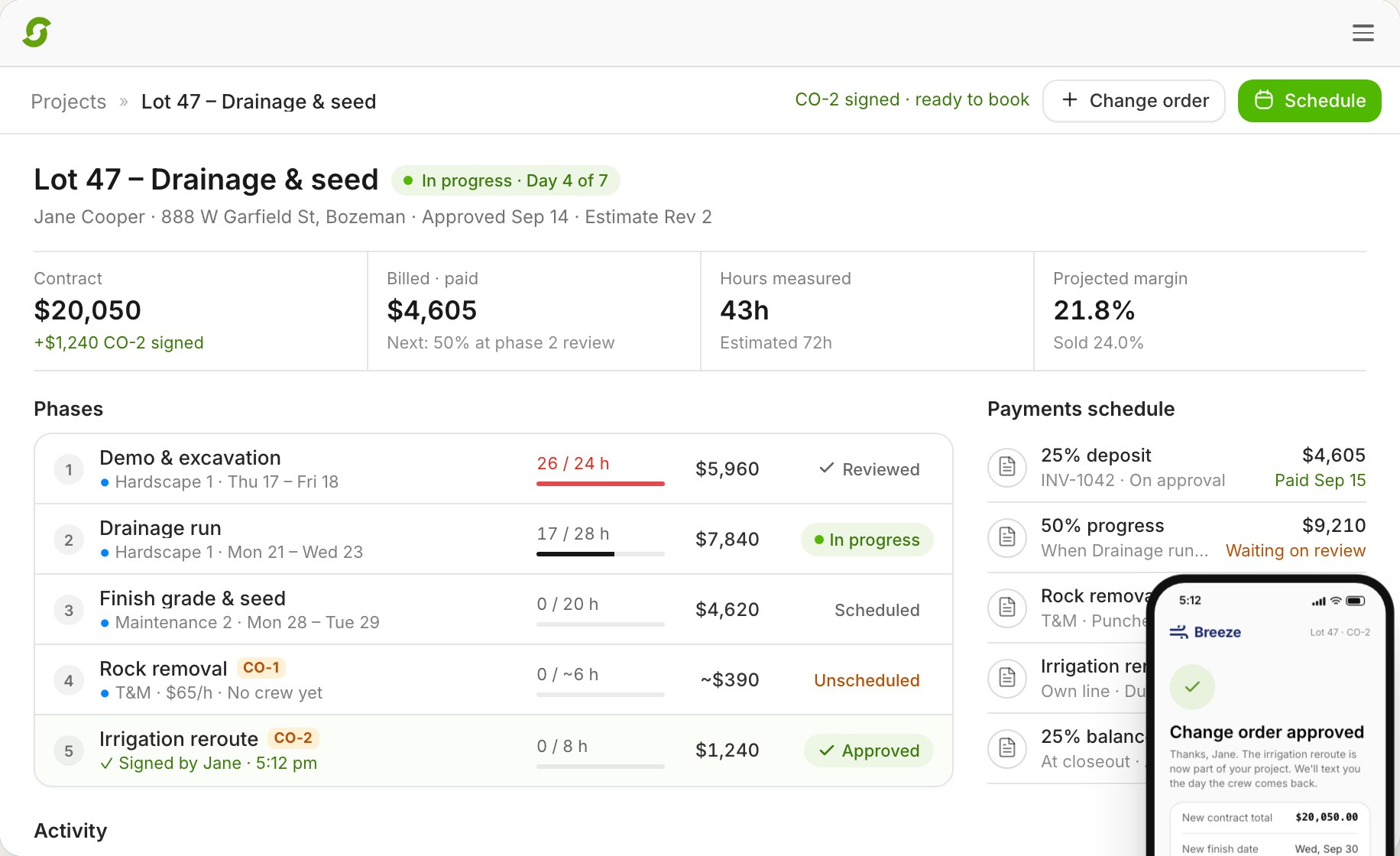
A multi-day install with hours measured per phase, crew progress, and a change order signed from the field (example data)

The problem with installs

An install is a contract, not a visit.

Maintenance software treats an install like one long job: one price, one invoice at the end. The work doesn't run that way. It's sold with a deposit, built in phases over days, changed halfway through, and paid in parts, while the maintenance crews still need their routes. When the install lives in a spreadsheet and a group text, the change order is a conversation nobody wrote down, and the margin is a surprise at the end.

How Shortcut does it

From estimate to closeout, in one place.

Estimates with a break-even.

Build the estimate from your price book: materials, labor, and equipment at cost plus markup, grouped into phases. Labor hours come from each item's rate, and the panel shows budget hours, direct cost, overhead, break-even, and margin against your target as you go.

Signed online.

Send it by email or text. The customer ticks the optional items they want, asks a question if they have one, signs by typing or drawing, and pays the deposit now or later. The signature is kept with the revision they agreed to.

Phases on the schedule.

Approved work waits in a backlog until it's ready. Schedule each phase to an install team and Shortcut works out the days from the hours and the team size. A drag-and-drop timeline shows the whole project, and a rain day shifts the phases behind it.

Change orders from the field.

A crew lead taps Need a change, adds photos and rough hours, and says whether the crew kept working. The office prices it and sends it, the customer approves and signs from a link, and the new work lands on the schedule.

Billing that follows the contract.

A deposit invoice goes out on approval. Progress invoices are drafted as phases pass review, time-and-materials phases bill from measured hours and materials used, and closeout drafts the final invoice. Customers pay on the same invoice page as your maintenance work.

Margin while it's happening.

Crew hours come from the time clock, matched to time on site. Each phase review shows hours against budget and margin against what was sold, and closeout shows realized margin against sold, phase by phase.

  • Crews see the phase, the checklist, and budget hours, never prices
  • The crew app works offline

Watch · 2:35

One install, from estimate to closeout.

The real product, start to finish, on a demo company's example data.

Book a demo

A 20-minute call to see if Shortcut fits how you run.

Billing

Every invoice the contract calls for.

Payment schedules start from a preset you choose in Settings: 25/50/25, 30/40/30, 50/50, or 100%.

InvoiceWhen it's billed
DepositOn approval, sent automatically
ProgressWhen a phase passes review, drafted for the office to send
Time and materialsMeasured crew hours at the phase rate, plus the materials used
Change orderOn its own invoice when it's signed, or added to the next invoice
FinalAt closeout, drafted from what's left on the contract

Project invoices sync to QuickBooks Online like any other invoice.

Pricing

Installs and maintenance, one price.

One price per crew, with unlimited users and every feature. No add-ons, no onboarding fee, no contract.

$180per crew
per month

Save 20%Pay yearly: $144 per crew per month. That's $432 back per crew, every year.

Running 1 or 2 crews? Start a 14-day free trial, no card.

Landscape project management questions, answered.

Pricing, switching, and what Shortcut does today, in plain words.

What is landscape project management software?

Software that runs an install from estimate to closeout: the estimate and contract, the phases on the schedule, change orders, deposits and progress payments, and the margin as the work happens. Shortcut does it in Projects, next to your maintenance routes.

Can customers sign the estimate online?

Yes. They open the estimate from an email or text, tick any optional items, and sign by typing or drawing. They can pay the deposit right away or later.

How do change orders work?

A crew lead can start one from the field with photos and rough hours. The office prices it and sends it, and the customer approves and signs from a link, or declines. Signed work lands on the schedule, and a fixed-price change order gets its own invoice or joins the next one.

Can I bill time and materials?

Yes. Each phase is fixed price or time and materials. Time-and-materials phases bill from the crew's measured hours at the phase rate, plus the materials used.

How do installs fit with my maintenance crews?

Both run from the Dispatch page: maintenance routes in one view, installs in another, with a today and a week view for install teams. A crew pulled onto a project shows an On install chip on the maintenance board.

What do crews see?

The phase, the checklist, the budget hours, and the materials to log, in the crew app, which works offline. The lead declares progress with photos, and anyone on the crew can flag a change. Crews never see prices.

How do I know if a project is making money?

Each phase review shows hours against budget and margin against what was sold, and the project page projects the final margin from actual labor and materials. Closeout shows realized margin against sold, phase by phase.

How much does it cost?

$180 per crew per month, or $144 billed yearly, with installs, every other feature, and unlimited users included.

See it on a business like yours.

Book 20 minutes with the team that built Shortcut. Bring an install you sold this year, and we'll walk it from estimate to closeout.

  1. 1Tell us about your business. Name, crews, what you run today. Thirty seconds.
  2. 2Pick a time. Chance's calendar opens right here, with your details already filled in.
  3. 3See it work. Twenty minutes, live, with the team that built it. We'll show you the board and tell you straight if it fits.

Rather skip the form? Open the calendar. Running 1 or 2 crews? Start a 14-day free trial, no card.

Crews

No fee, no commitment. Running one crew? This takes you to a free trial instead.

Book a demo

  1. 1Tell us about your business. Name, crews, what you run today. Thirty seconds.
  2. 2Pick a time. Chance's calendar opens right here, with your details already filled in.
  3. 3See it work. Twenty minutes, live, with the team that built it. We'll show you the board and tell you straight if it fits.
Crews

No fee, no commitment. Running one crew? This takes you to a free trial instead.