Four tabs, one board.
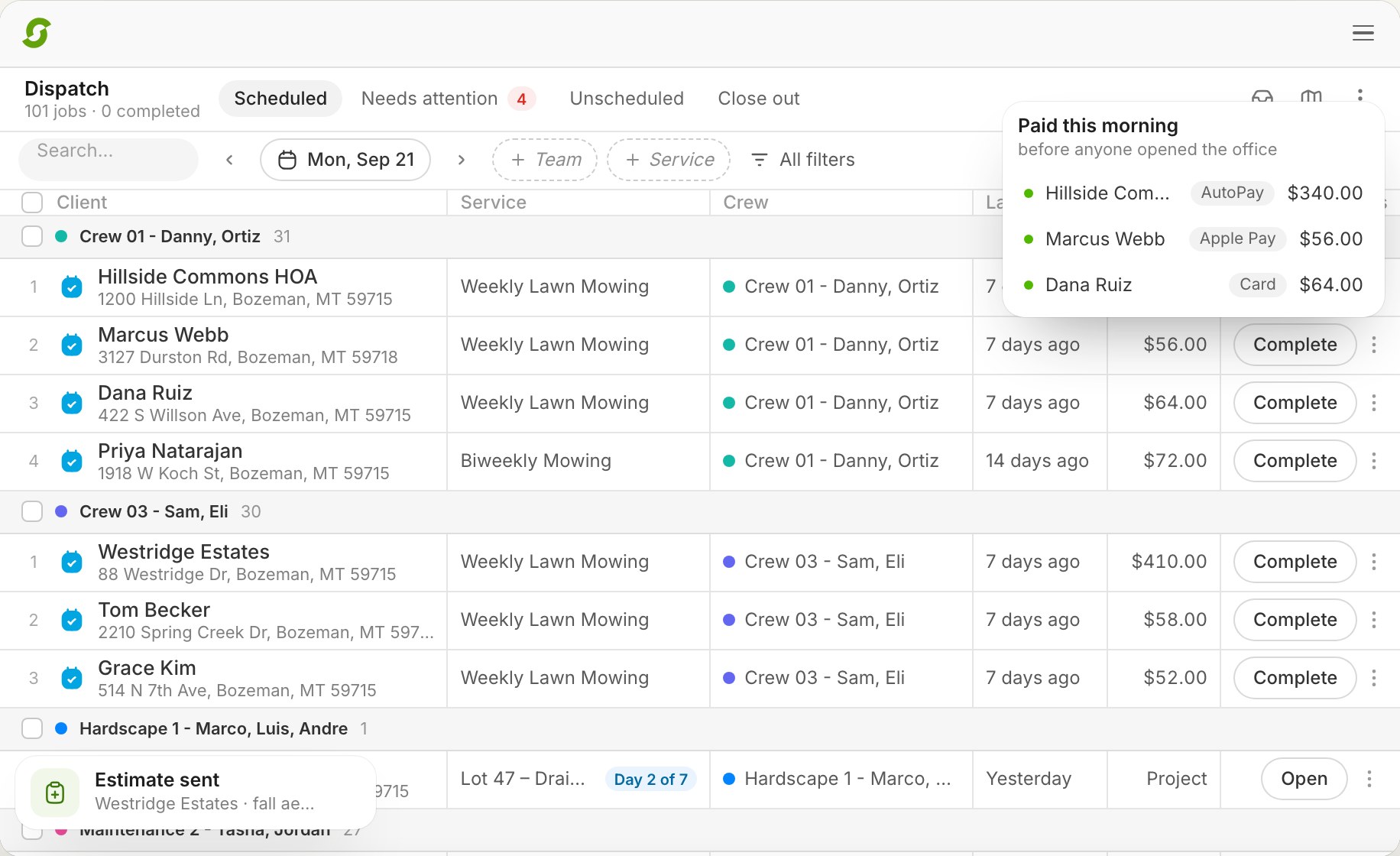
Scheduled is the day's plan in driving order. Needs attention is everything waiting on a decision. Unscheduled is work with no date yet. Close out is yesterday's work with the money showing, before invoices go out.
At three crews the whiteboard stops working. At six, the group text does. Shortcut's Dispatch is the whiteboard in your shop, except it updates itself: every scheduled visit shows up on its date, under the crew doing it, in the order they'll drive. You move things, the crews' phones update, and the invoices are ready when the work is done.
A 20-minute call to see if Shortcut fits how you run. Running 1–2 crews? Start a free trial
The problem at five crews
One truck can run from a calendar. Five trucks produce a stop skipped because the gate was locked, a crew that ran out of daylight, a new customer imported with no crew, two crews booked at the same house, and a spray round that came due while nobody was looking. On a calendar, each of those is a phone call you have to remember to make. Dispatch software built for multiple crews collects them in one place and puts the fix next to each one.
How Shortcut does it
Scheduled is the day's plan in driving order. Needs attention is everything waiting on a decision. Unscheduled is work with no date yet. Close out is yesterday's work with the money showing, before invoices go out.
Drag to reorder a route for today or for good. Move a stop between crews.
When plans change, text or email every affected customer from the board, with templates. The two-way inbox catches the replies.
Open the route map, lasso a neighborhood, move it to Thursday, and text everyone about the new day.
Optimize one crew or the whole day. Miles and drive time before and after for each crew, and nothing changes until you apply it. More on routing.
AI fixes a rained-out morning or rebalances crews through the same preview and undo. Chemical rounds show as due, installs run as Projects with phases, and snow has its own filter when it snows.
Needs attention
The count only goes down when someone deals with an item. Nothing quietly ages out.
| Why it's here | Red flag | The button |
|---|---|---|
| Nobody is assigned | No crew | Assign crew |
| The day passed and the visit is still open | Not finished | Reschedule |
| A crew tapped Reschedule or Skip | Needs rescheduling, Skipped | Reschedule |
| Two crews at the same property, same day | Double-booked | Resolve |
| The address can't be placed on the map | Missing coordinates | Fix address |
| A chemical round is due and nothing is scheduled | Chemical due | Schedule |
| An hourly job needs another day | Additional workday | Schedule |
Compared
| Feature | Shortcut | Aspire | Service Autopilot | RealGreen | Jobber |
|---|---|---|---|---|---|
| Mowing and maintenance routes | Yes | Yes, bolted onto an install-first product | Yes | Yes | Yes |
| Spraying: programs, rounds, application records | Yes | Limited | Yes | Yes | No |
| Installs: phases, change orders, milestone billing | Yes, on the same board as your routes | Yes | No | No | Generic jobs, no phases |
| Pricing | $180 per crew, flat | Quote-based, per user | Tiers, plus users and paid add-ons | Quote-based | Tiers, per user |
| Implementation | Overnight, then up to two weeks side by side | Months, with a consultant | Weeks to months, paid onboarding | Weeks to months | Self-serve |
| Support | A real person, same day | Account manager, ticket queue | Ticket queue | Ticket queue | Chat and phone |
| Unlimited users | Yes | No | No | No | No |
Competitor cells reflect their public pricing pages and documentation as of September 2026. If one is out of date, tell us and we'll fix it the same day. Row by row with sources: Service Autopilot · RealGreen · LMN · Aspire.
Pricing, switching, and what Shortcut does today, in plain words.
Software that puts every scheduled visit under the crew doing it, in driving order, and lets the office move work between crews and days while the crews' phones update. Shortcut's Dispatch does that for every crew on one board, with undo on every move.
Scheduling decides when a job recurs. Dispatch runs the day: which crew, in what order, and what to do when the day changes. Shortcut does both.
Yes. Select the stops, bulk reschedule to the new day, preview the change set, apply it, and text every customer in one step. Undo if it's wrong.
Their own stops for the day in the Shortcut app, in the order you set, with directions, notes, photos, and the property card. Crews don't see Dispatch itself.
The Needs attention tab lists skipped and sent-back stops, stops with no crew, double-bookings, missing addresses, overdue chemical rounds, and hourly jobs that need another day, each with the button that fixes it.
Yes. Chemical rounds, mowing routes, installs, and snow run on the same board, with filters for each.
$180 per crew per month, or $144 billed yearly, with everything included and unlimited users. Dispatch is not a tier or an add-on.
Shortcut's board has the unscheduled queue, the map, lasso, and bulk actions Service Autopilot users rely on, with a preview and undo on every move, and the map included rather than an add-on.
Book 20 minutes with the team that built Shortcut. Bring your messiest week and we'll run it on the board.
Rather skip the form? Open the calendar. Running 1 or 2 crews? Start a 14-day free trial, no card.