Auto-measure from above.
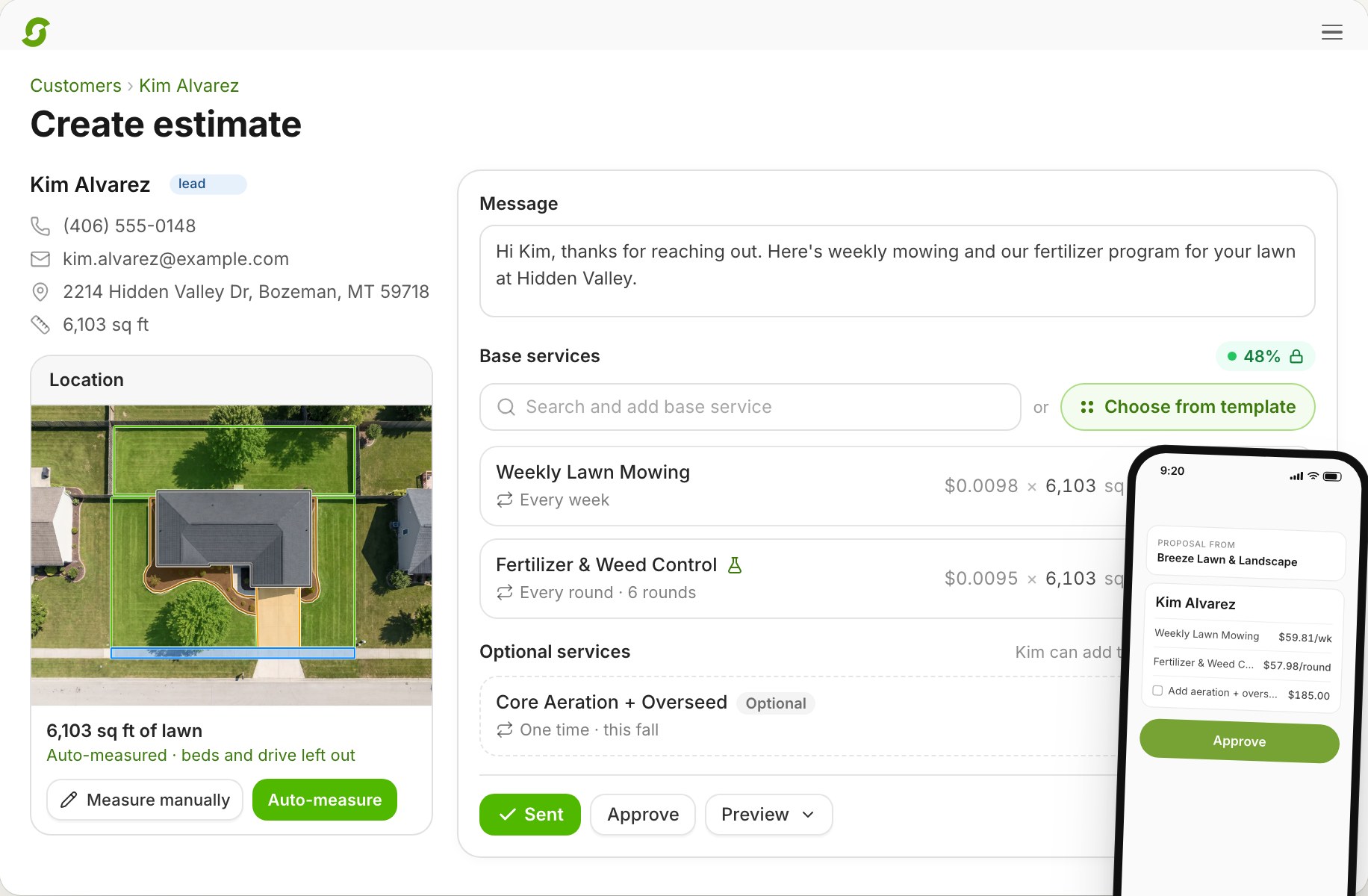
Click Auto-measure on the property and Shortcut scans the lot for lawn, structures, and driveway. Check the outlines, adjust one if you need to, and accept. Nothing prices from a measurement nobody has reviewed.
Most estimates stall on two things: a drive out to measure, and a round of back-and-forth about options. Shortcut measures the lawn from aerial imagery, prices every per-square-foot service from it, and sends an estimate the customer approves from a text or email. Approve it, and the jobs are created and waiting to be scheduled.
A 20-minute call to see if Shortcut fits how you run. Running 1–2 crews? Start a free trial
The problem with estimates
A lawn estimate used to mean a drive out with a measuring wheel, numbers on a pad, and typing it up that night. Then the customer asks for a second option, and the quote goes around again. At five crews, someone is doing that all day, and the estimate that waits until Friday is the one that goes to another company.
How Shortcut does it
Click Auto-measure on the property and Shortcut scans the lot for lawn, structures, and driveway. Check the outlines, adjust one if you need to, and accept. Nothing prices from a measurement nobody has reviewed.
Per-square-foot services take the measured lawn as their quantity, and size tiers pick the right rate for bigger properties. Change the measurement and Shortcut asks before it updates a line.
Flat fee, per hour, per square foot, or per man-hour, where the final price follows the crew time the job takes. Set how often each line repeats: one-off, or every so many days, weeks, months, or years.
Mark a line optional and the customer adds or drops it as they read, with the total updating. Add an alternative to offer Gold or Silver, pine or aspen.
Add mulch by the yard, plants, or pavers under a service. Price, cost, and margin show as you quote, and customers never see cost.
Send by text, email, or both. The customer approves from the link, or you approve it for them when they say yes in person. Approval creates the jobs and runs your automations.
Watch · 1:47
The real product, start to finish, on a demo company's example data.
A 20-minute call to see if Shortcut fits how you run.
Measurement
| Product | How the property is measured |
|---|---|
| Shortcut | Auto-measured from parcel data and imagery, built in, no per-measure fee |
| Service Autopilot | Smart Maps add-on; you draw the lines1 |
| RealGreen | Measurement Assistant, sold as a separate subscription2 |
| LMN | A SiteRecon add-on3 |
| Aspire | PropertyIntel, a separate product at $199 to $499 a month4 |
Competitor rows reflect their own product and pricing pages as of October 2026.
Pricing
One price per crew, with unlimited users and every feature. No add-ons, no per-measure fees, no onboarding fee.
$180per crew
per month
Save 20%Pay yearly: $144 per crew per month. That's $432 back per crew, every year.
Running 1 or 2 crews? Start a 14-day free trial, no card.
Pricing, switching, and what Shortcut does today, in plain words.
Software that measures the property, prices the work from your services, and sends a quote the customer can approve online. Shortcut does all three, and an approved estimate puts the work on the schedule.
From parcel data and aerial imagery. Auto-measure finds the lawn, structures, and driveway; you review the outlines and accept them before any price uses them. You can also draw the areas yourself.
Yes. Quote the hourly rate and an estimated number of man-hours. The invoice follows the crew time the job takes, and a job that runs long can continue the next day and bill once.
Yes. Customers can add or drop optional lines while they read, and alternatives let them pick one version of a service, with the total updating as they choose.
Yes. Products sit under a service with their own price, cost, and tax setting. You see the margin as you quote; the customer sees the price.
The jobs are created and wait to be scheduled, your automations run, and the estimate locks. Products wait on the job and attach to its first visit.
After 30 days if they're not approved. You can void one sooner.
$180 per crew per month, or $144 billed yearly, with estimates, measurement, every other feature, and unlimited users included.
Book 20 minutes with the team that built Shortcut. Bring an address you quoted last week, and we'll measure and price it on the call.
Rather skip the form? Open the calendar. Running 1 or 2 crews? Start a 14-day free trial, no card.